Limelight combines the features serious movie fans actually use: a Seen List for tracking your watch history, a Watchlist for saving what you want to see, unlimited custom lists, multi-source ratings from Rotten Tomatoes, IMDB, Metacritic, and TMDB, streaming availability lookup across all major platforms, AI scene recognition, and book adaptation discovery — all in one ad-free app available on iOS and Android.
Movie tracker app for cinephiles & film fans



The movie tracker for people who take film seriously
Track everything you've watched. Build lists for every obsession. Get ratings from every source that matters. Find where to stream. No ads, no social feed — just you and your movie habit.
Who this is for
You watch movies differently
There's a particular kind of movie watcher who remembers not just what they saw, but when they saw it, who they saw it with, and how they felt about it afterward. Who builds watchlists the way other people build playlists. Who has actual opinions about the Tomatometer versus the Audience Score. Who checks whether there's source material before a film comes out.
Most movie tracker apps weren't built for you. They're built for the casual viewer who wants to know what's trending on Netflix this weekend and doesn't think much beyond that. Or they're built so deep around social features — reviews, followers, public lists — that tracking your own watch history becomes secondary to performing it for an audience.
Limelight is a personal movie tracker. It's built for the cinephile who wants to track, discover, and organize without an audience and without ads. Your lists are private. Your film log is yours. The experience is clean because we took everything out that wasn't useful and kept everything that was.
It covers movies and TV shows equally — not movies first with TV as an afterthought. Your Watchlist and Seen List hold both. Every feature works the same way for a 1974 Bergman film as it does for a prestige HBO series.
"Track what you've seen, organize what you want to watch, and stop losing time figuring out where to stream it."
Seen List & Watchlist
Your watching history, properly kept
The Seen List is the most important feature in Limelight for serious movie fans — and the one that takes the longest to fully appreciate. Every film you mark as seen gets logged there, permanently and cleanly. Not buried in a social feed. Not mixed with ratings you wrote for other people. Just your list, searchable, always there.
There's something genuinely satisfying about a complete record — a real film log, not just a mental tally. Knowing you've worked through all of Kubrick's major films. Knowing you watched five Agnès Varda features in a single month. Knowing you'd seen "The Godfather" four times before you finally convinced yourself to sit down with Part II. Your Seen List is a personal movie diary that holds all of that without requiring you to do anything with it.
Your Watchlist grows faster than you can work through it — that's the right problem to have. Every time a friend recommends something, every time a trailer catches your eye, every time a critic mentions a film you haven't seen, it goes in the Watchlist. Limelight keeps it organized so the list doesn't become a graveyard of half-remembered titles you can never find again.

Seen List
A permanent, searchable record of every movie and TV show you've watched. Syncs across devices through your free TMDB account.

Watchlist
Save anything you want to watch later. Never lose track of a recommendation again, no matter where you heard it.

Pinned Items
Keep your current priority at the top. Pin what you've committed to watching this week without losing everything else.

QuickSort
Swipe through movie cards to mark them as seen or not. The fastest way to get years of mental tracking onto a list in one session.
Multi-source ratings
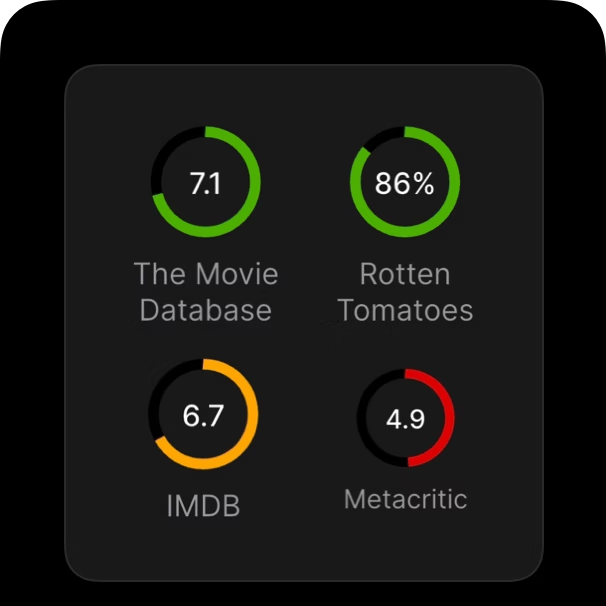
Rotten Tomatoes, IMDB, Metacritic, and TMDB — one screen
Serious film viewers don't trust a single rating. They know how to read the gap between an 83% on Rotten Tomatoes and a 6.4 on IMDB and understand what it probably says about the film and its audience.
Limelight+ shows Rotten Tomatoes, IMDB, Metacritic, and TMDB scores on every title — consolidated on the details page, without opening four different apps. Each number carries different information, and knowing the differences makes all of them more useful.
Limelight doesn't collapse these into a single "Limelight Score." That would throw away all the texture. You get all four, you apply the context you already have, and you make a better-informed decision about whether a film is worth your time.
Custom Lists
Build the lists you actually want to build
The best way to engage seriously with film is through curation. Making lists forces you to commit to opinions, notice patterns, and build a personal canon that reflects how you actually feel about what you've watched — not how you're supposed to feel.
Limelight+ lets you create unlimited custom lists. No templates, no categories we've pre-defined for you. Just a name and a collection of titles — any mix of movies and TV shows, in any order you want.
Film enthusiasts tend to build two kinds of lists. The obsessive collecting kind: every film that won the Palme d'Or, the complete Criterion Collection, every Tarkovsky feature in chronological order, every film with a score by Ennio Morricone. And the practical kind: "Under 90 Minutes," "Watch With My Partner," "Already Own on Blu-ray," "Films I Recommended and Need to Follow Up On." Both matter. Limelight handles both without judgment.
Custom lists are private by default. There's no audience, no performance, no context beyond your own. They exist purely as organizational tools for how you watch.
Every Kubrick, in order
13 films, watching one per month
French New Wave
Working through the essentials
Watch with Dad
Films he'd actually sit through
Under 90 Minutes
For when there isn't much time
Re-watch candidates
Films due for a second look
1974
Every film from that year
SceneSnap
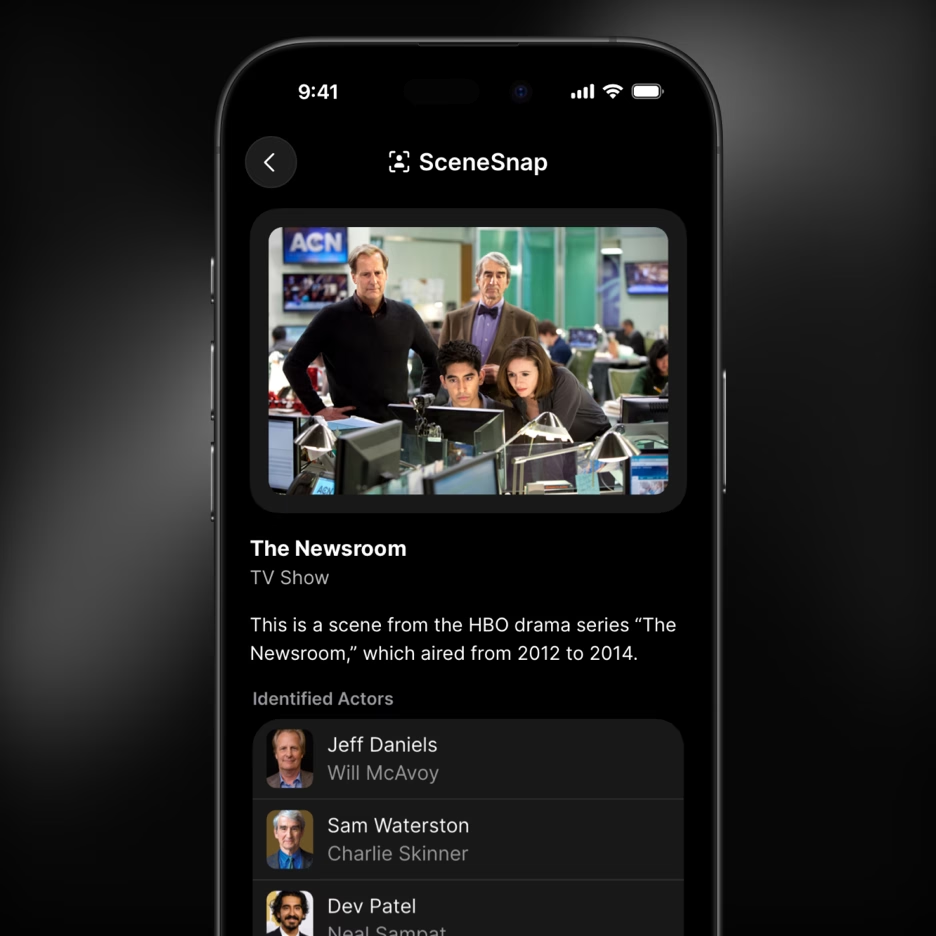
Finally know what you're looking at
There's a specific frustration that serious movie fans know well: you see a frame somewhere — on social media, in a video essay, on someone's phone, on a poster in the background of a photograph — and you can't quite place it. The cinematography is familiar. The actor is someone you recognize from something. You've definitely seen this before. It's going to bother you until you figure it out.
SceneSnap solves that. Take a photo of your screen, upload a screenshot from your camera roll, and Limelight's AI identifies the movie or TV show — the title, the scene, and the actors in frame. It works on stills, on video clips playing on a screen, on anything you can point a camera at.
When SceneSnap finds a match, it opens the title's details page in Limelight. From there you can add it to your watchlist, check where it's streaming right now, read the full cast and crew, and get recommendations for similar films. One photo closes the loop on a question that used to require a half-hour of searching.
For movie fans who spend time in video essays, film discussion communities, or the general flow of film-adjacent content online, SceneSnap is the feature that catches moments that would otherwise slip away.
Book Adaptations
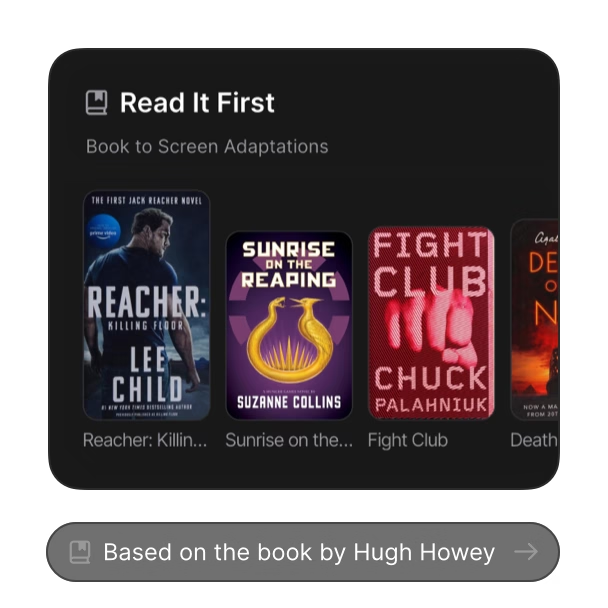
Read it first
For many film enthusiasts, the most important decision before watching an adaptation isn't which version to watch or which director's cut to seek out — it's whether to read the source material first. The experience of reading McCarthy's No Country for Old Men before the Coen Brothers' film is genuinely different from reading it after. Neither is wrong. But making that choice requires knowing the source material exists in the first place.
Limelight surfaces book adaptations automatically. On the details page for any film or TV show adapted from a book, you'll see the source text — novel, novella, short story, play, or non-fiction — with a direct link to find it. This works for the obvious literary adaptations and for less well-known cases equally. You're not going to miss that a film you're considering is based on a 1950s Japanese novel because you forgot to research it.
The home feed in Limelight also highlights upcoming adaptations currently in production or recently released, so you can get ahead of the films before they come out. The read-it-first decision only works if you have enough lead time to actually do it.
Where to Watch
Stop searching for where it streams
Even the most dedicated film viewer loses time to the same question: where does this actually stream right now? Streaming rights move constantly. Films that were on Netflix six months ago are on Prime today, only available to rent, or temporarily gone entirely. Keeping up mentally is impossible when you have a watchlist of any real depth.
Limelight shows streaming availability for any title in one place — which platforms it's currently on, whether it's available to rent or purchase, and what the options are across Netflix, Amazon Prime Video, Disney+, Hulu, Max, Paramount+, Peacock, and Apple TV+. Rental and purchase options on Apple TV, Amazon, and Vudu are included as well.
This information is on every title's details page, instantly, without switching apps. For movie enthusiasts with long watchlists who actively work through them across multiple platforms, knowing at a glance where something is available changes how you plan what to watch — and how quickly you actually start watching instead of searching.
Limelight vs. Letterboxd, Trakt, TV Time & more
Different tools for different jobs
Letterboxd is built around community. It's excellent for what it does: logging films, writing reviews, sharing lists, following critics and other fans, engaging with the social side of film culture. If that matters to you, Letterboxd is genuinely worth using. But it doesn't support TV shows (announced in 2024, still not launched), doesn't show where to stream anything, and has no equivalent to SceneSnap.
Trakt is the right tool if you run a media center like Plex or Kodi and want automatic scrobbling. It's powerful, but the setup is technical and the interface reflects it. It's built for power users who want deep integrations, not a clean daily-use discovery app.
TV Time skews heavily toward social features and episode-by-episode TV tracking. The free tier is ad-supported. Discovery and streaming availability aren't its focus.
JustWatch tells you where to stream something, but it doesn't help you decide what to watch, track what you've seen, or build any kind of watch history.
Limelight sits at a different point in the stack. It's the personal movie tracker built for cinephiles who want discovery, tracking, streaming availability, and multi-source ratings in one clean, ad-free app — without social pressure, technical complexity, or ads. Some dedicated film fans use Limelight alongside Letterboxd: Limelight for the practical side, Letterboxd for the social layer. That's a reasonable setup.
| Feature | Limelight | Letterboxd |
|---|---|---|
| Movie tracking | ||
| TV show tracking | ||
| Streaming availability | ||
| Multi-source ratings | ||
| AI scene recognition | ||
| Book adaptation links | ||
| Custom lists | ||
| Ad-free | ||
| Social community |
Questions
Frequently asked questions
Both, equally. Limelight covers movies and TV shows with the same depth — details, ratings, streaming availability, cast and crew, trailers, and tracking all work the same way for both. Your Seen List and Watchlist can hold any mix of films and series, and SceneSnap identifies TV show scenes as well as movie scenes.
Limelight and Letterboxd serve different purposes. Letterboxd is a social film diary built around community, reviews, and sharing — it's excellent at that. Limelight is a personal tool focused on discovery, tracking, and streaming availability. Limelight also supports TV shows (Letterboxd's TV support has been announced but not yet launched), shows where to stream any title, and includes SceneSnap for AI-powered scene identification. Some dedicated movie fans use both.
Yes, through custom lists (Limelight+). You can create any list with any name and add any combination of movies and TV shows to it. Limelight doesn't impose a structure — you build the organizational system that fits how you watch. Common uses include directors' filmographies, decade collections, thematic lists, re-watch candidates, and curated recommendations for specific people.
Yes. Limelight+ shows Rotten Tomatoes (Tomatometer and Audience Score), IMDB, Metacritic, and TMDB scores on every title, consolidated on the details page. The free tier shows TMDB ratings. Multi-source ratings are a Limelight+ feature at $24.99/year or $2.99/month.
No. Limelight is a personal tool, not a social network. There are no public profiles, no follower feeds, no public lists, and no social pressure. Your watch history and lists are private. The sharing feature lets you send a specific title directly to someone — it's not a broadcast mechanism. If you want community and reviews, Letterboxd does that better than Limelight will.
Limelight is a free, ad-free movie tracker available on iOS and Android. The core features — search, streaming availability, Watchlist, Seen List, trailers, cast and crew details, and personalized recommendations — are all free with no advertising in any tier. Limelight+ ($2.99/month or $24.99/year) unlocks SceneSnap AI scene recognition, multi-source ratings from Rotten Tomatoes, IMDB, and Metacritic, QuickSort, streaming Top 10s, and unlimited custom lists.
Trakt is an automatic tracking service built for users running media centers like Plex or Kodi — powerful, but technically complex. TV Time focuses on social, episode-by-episode TV tracking with an ad-supported free tier. Limelight is a personal discovery and tracking app for both movies and TV, with streaming availability lookup, multi-source ratings, and AI scene recognition. No technical setup, no ads, no social feed.
The core app is free: search, streaming availability, Watchlist, Seen List, trailers, cast and crew details, personalized recommendations, and book adaptations. Limelight+ adds multi-source ratings, SceneSnap, QuickSort, streaming Top 10s, pinned items, and unlimited custom lists for $24.99/year or $2.99/month. No ads in either tier.
Your movie habit deserves a better app
Track what you've watched, build the lists you've always wanted, get ratings from every source that matters, and stop losing time searching for where to stream. Free to download.